在 Kubernetes 部署 Istio 【demo演示】
可参考官方文档(https://istio.io/latest/zh/docs/setup/install/) ,以部署1.7.4版本作为演示,在Mac上安装
基础环境
- cloud(ali)
- kubernetes(1.16.9)
- istio(1.7.4)
安装配置
# mkdir istio# cd istio# wget https://github.com/istio/istio/releases/download/1.7.4/istio-1.7.4-osx.tar.gz# lltotal 94336-rw-r--r-- 1 root wheel 45M Nov 9 09:54 istio-1.7.4-osx.tar.gz# tar xf istio-1.7.4-osx.tar.gz # cd istio-1.7.4# lsLICENSE README.md bin manifest.yaml manifests samples tools# ls bin istioctl# export PATH=$PATH:$PWD/bin# echo $PATH/usr/local/bin:/usr/bin:/bin:/usr/sbin:/sbin:/usr/local/go/bin:/var/root/gitlab/istio/istio/istio-1.7.4/bin# istioctl version no running Istio pods in "istio-system"1.7.4部署istio组件
目录结构
# lltotal 48-rw-r--r-- 1 root wheel 11K Oct 24 07:12 LICENSE-rw-r--r-- 1 root wheel 5.6K Oct 24 07:12 README.mddrwxr-x--- 3 root wheel 96B Oct 24 07:12 bin-rw-r----- 1 root wheel 815B Oct 24 07:12 manifest.yamldrwxr-xr-x 6 root wheel 192B Oct 24 07:12 manifestsdrwxr-xr-x 21 root wheel 672B Oct 24 07:12 samplesdrwxr-x--- 7 root wheel 224B Oct 24 07:12 tools可以看到有4个目录(bin、manifests、samples、tools)及3个文件(LICENSE、README.md、manifest.yaml)
其中bin下是istioctl执行程序,manifests是istio相关的主要部署组件,manifest.yaml是当前istio版本(1.7.4)中manifests目录下各组件的配置和依赖描述,samples是一套istio应用样例,用来部署测试做功能校验的,tools是一些工具脚本
打开README.md发现,主要说了3个点,istio的功能介绍、项目git仓库、以及问题优化管理原则,并没有直接给出安装使用方法
In this README:- [Introduction](#introduction)- [Repositories](#repositories)- [Issue management](#issue-management)istioctl使用
# istioctl -hIstio configuration command line utility for service operators todebug and diagnose their Istio mesh.Usage:istioctl [command]Available Commands:analyze 分析Istio配置并打印验证消息authz (authz是实验性的。使用"istioctl experimental authz")convert-ingress 将入口配置转换为Istio VirtualService配置dashboard 访问Istio web UIderegister 取消注册服务实例experimental 可能被修改或弃用的实验性命令help 关于任何命令的帮助install 应用Istio清单,在群集上安装或重新配置Istiokube-inject 将特使边车注入kubernetes pod资源manifest 与Istio清单相关的命令operator 与Istio操作员控制器相关的命令profile 与Istio配置文件相关的命令proxy-config 从特使处检索有关代理配置的信息[仅限kube]proxy-status 检索网格中每个特使的同步状态[仅限kube]register 注册加入网格的服务实例(例如VM)upgrade 升级Istio控制平面就位validate 验证Istio策略和规则文件verify-install 验证Istio安装状态version 打印出内部版本信息Flags: --context string 要使用的kubeconfig上下文的名称-h, --help istioctl帮助-i, --istioNamespace string Istio system命名空间(默认为"Istio system")-c, --kubeconfig string Kubernetes配置文件-n, --namespace string 配置命名空间Additional help topics:istioctl options 显示istioctl全局选项Use "istioctl [command] --help" for more information about a command.从istioctl帮助说明可以看出,istioctl有很多子命令,经过测试试用发现其中与部署相关的主要有3个(install、manifest、operator):
install 应用Istio清单,在群集上安装或重新配置Istiomanifest 与Istio清单相关的命令operator 与Istio操作员控制器相关的命令istio profile
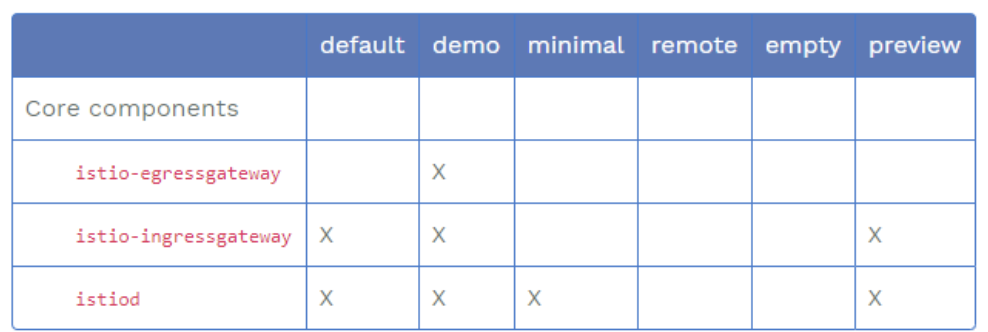
下表中标记为 X 的组件就是包含在配置文件里的内容:
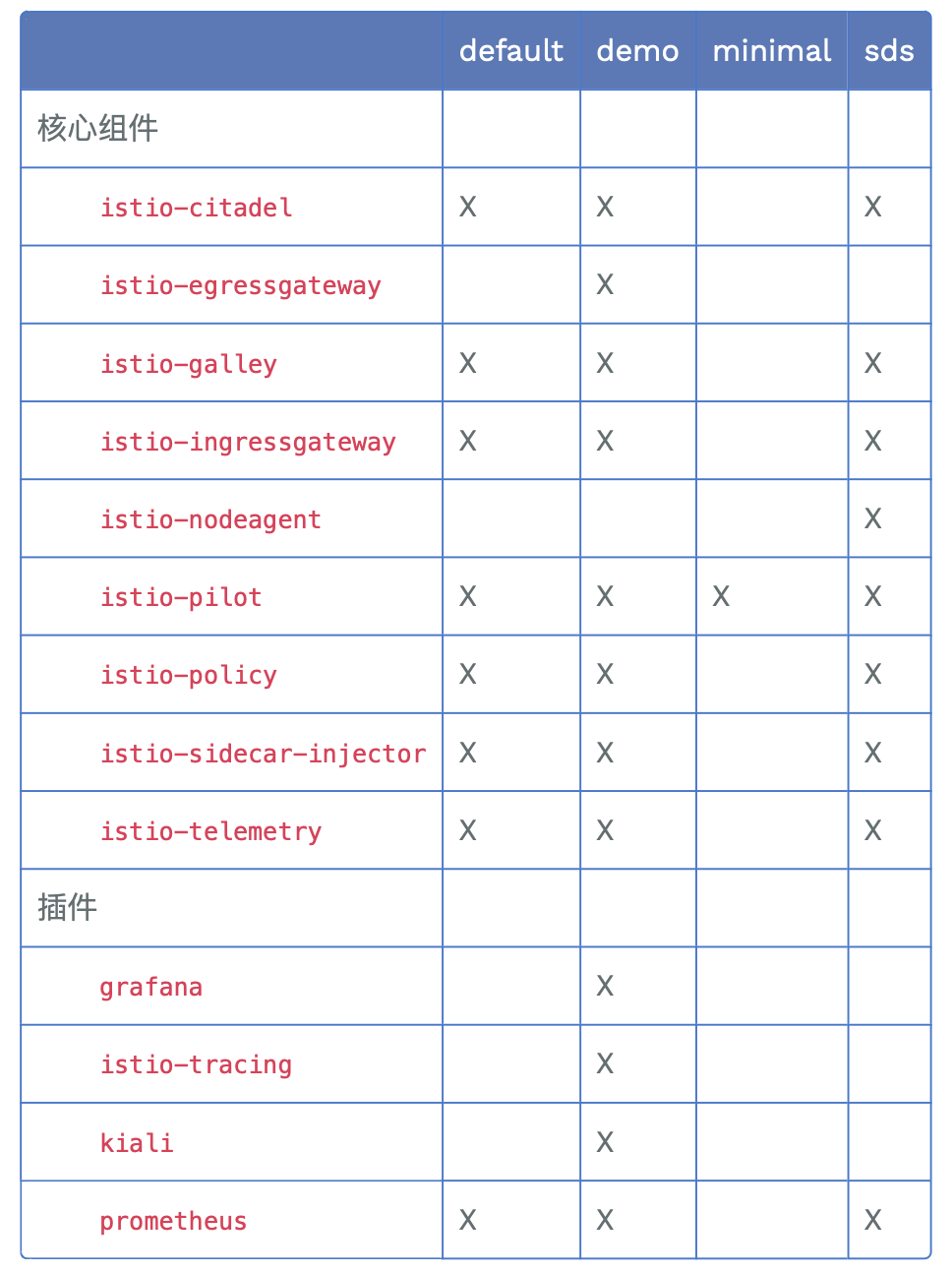
| 1.5前pod | 作用 | 1.5后pod | 说明 |
|---|---|---|---|
| egressgateway | 对外网关 | √ | 保留 |
| ingressgateway | 对内网关 | √ | 保留 |
| citadel | 证书管理和分发 | ||
| galley | 配置管理中心 | istiod | 合并后保留 |
| pilot | 流量管理中心 | ||
| sidecar-ingector | 边车代理自动注入 | ||
| polic | Mixer策略管理 | X | 作为proxy扩展 |
| telemetry | Mixer遥测管理 | X | 作为proxy扩展 |
| kiali,prometheus,grafana,tracing(jaeger) | 可视化 | √ | 保留 |
标识Istio 功能或组建
https://istio.io/latest/zh/docs/setup/install/istioctl/#customizing-the-configuration
istioctl install 部署
istioctl install 是默认部署,按manifests/profile/default.yaml配置部署对应的组件,如下:
# lltotal 72-rw-r--r-- 1 root wheel 15K Oct 24 07:12 default.yaml-rw-r--r-- 1 root wheel 1.8K Oct 24 07:12 demo.yaml-rw-r--r-- 1 root wheel 320B Oct 24 07:12 empty.yaml-rw-r--r-- 1 root wheel 219B Oct 24 07:12 minimal.yaml-rw-r--r-- 1 root wheel 405B Oct 24 07:12 preview.yaml-rw-r--r-- 1 root wheel 119B Oct 24 07:12 remote.yaml# istioctl profile listIstio configuration profiles: default demo empty minimal preview remote# # istioctl installThis will install the default Istio profile into the cluster. Proceed? (y/N) yDetected that your cluster does not support third party JWT authentication. Falling back to less secure first party JWT. See https://istio.io/docs/ops/best-practices/security/#configure-third-party-service-account-tokens for details.✔ Istio core installed ✔ Istiod installed ✔ Addons installed ✔ Ingress gateways installed✔ Installation complete当然,也可以使用-d参数指定某个目录部署,这里通过--set 指定manifests/profiles目录下的某一类配置安装,以demo为例
# ls manifests/profiles/default.yaml demo.yaml empty.yaml minimal.yaml preview.yaml remote.yaml# istioctl install --set profile=demoDetected that your cluster does not support third party JWT authentication. Falling back to less secure first party JWT. See https://istio.io/docs/ops/best-practices/security/#configure-third-party-service-account-tokens for details.✔ Istio core installed ✔ Istiod installed ✔ Egress gateways installed ✔ Ingress gateways installed ✔ Installation completeistioctl manifest 部署
istioctl manifest的使用帮助如下,其安装主要是通过install子命令来落地的,其安装执行参数和效果,与直接执行istioctl install是一样的
# istioctl manifestThe manifest subcommand generates, applies, diffs or migrates Istio manifests.Usage: istioctl manifest [command]Available Commands: diff Compare manifests and generate diff generate Generates an Istio install manifest install Applies an Istio manifest, installing or reconfiguring Istio on a cluster.Flags: --dry-run Console/log output only, make no changes. -h, --help help for manifestGlobal Flags: --context string The name of the kubeconfig context to use -c, --kubeconfig string Kubernetes configuration fileUse "istioctl manifest [command] --help" for more information about a command.istioctl manifest install --help说明如下:
# istioctl manifest install --helpThe install generates an Istio install manifest and applies it to a cluster.Usage: istioctl manifest install [flags]Examples: # Apply a default Istio installation istioctl install # Enable grafana dashboard istioctl install --set values.grafana.enabled=true # Generate the demo profile and don't wait for confirmation istioctl install --set profile=demo --skip-confirmation # To override a setting that includes dots, escape them with a backslash (\). Your shell may require enclosing quotes. istioctl install --set "values.sidecarInjectorWebhook.injectedAnnotations.container\.apparmor\.security\.beta\.kubernetes\.io/istio-proxy=runtime/default"Flags: --charts string Deprecated, use --manifests instead. -f, --filename strings Path to file containing IstioOperator custom resource This flag can be specified multiple times to overlay multiple files. Multiple files are overlaid in left to right order. --force Proceed even with validation errors. -h, --help help for install -d, --manifests string Specify a path to a directory of charts and profiles (e.g. ~/Downloads/istio-1.7.0/manifests) or release tar URL (e.g. https://github.com/istio/istio/releases/download/1.7.0/istio-1.7.0-linux-amd64.tar.gz). --readiness-timeout duration Maximum time to wait for Istio resources in each component to be ready. (default 5m0s) -r, --revision string Target control plane revision for the command. -s, --set stringArray Override an IstioOperator value, e.g. to choose a profile (--set profile=demo), enable or disable components (--set components.policy.enabled=true), or override Istio settings (--set values.grafana.enabled=true). See documentation for more info: https://istio.io/docs/reference/config/istio.operator.v1alpha1/#IstioOperatorSpec -y, --skip-confirmation skipConfirmation determines whether the user is prompted for confirmation. If set to true, the user is not prompted and a Yes response is assumed in all cases.Global Flags: --context string The name of the kubeconfig context to use --dry-run Console/log output only, make no changes. -c, --kubeconfig string Kubernetes configuration file具体执行结果如下:
# istioctl manifest install --set profile=demoDetected that your cluster does not support third party JWT authentication. Falling back to less secure first party JWT. See https://istio.io/docs/ops/best-practices/security/#configure-third-party-service-account-tokens for details.✔ Istio core installed ✔ Istiod installed ✔ Egress gateways installed ✔ Ingress gateways installed ✔ Installation completeistioctl operator
istioctl operator安装相对简单,主要是安装istioctl的operator,通过init子命令执行,结果如下:
# istioctl operator initOperator controller is already installed in istio-operator namespace, updating.Using operator Deployment image: docker.io/istio/operator:1.6.0✔ Istio operator installed ✔ Installation complete因istio operator已经通过istioctl manifest apply安装过了,所以提示installed
安装校验
istio verify-install (校验方式一)
首先,通过istioctl manifest generate 命令生成安装清单的校验文件,istioctl manifest generate使用说明如下:
# istioctl manifest generate --helpThe generate subcommand generates an Istio install manifest and outputs to the console by default.Usage: istioctl manifest generate [flags]Examples: # Generate a default Istio installation istioctl manifest generate # Enable grafana dashboard istioctl manifest generate --set values.grafana.enabled=true # Generate the demo profile istioctl manifest generate --set profile=demo # To override a setting that includes dots, escape them with a backslash (\). Your shell may require enclosing quotes. istioctl manifest generate --set "values.sidecarInjectorWebhook.injectedAnnotations.container\.apparmor\.security\.beta\.kubernetes\.io/istio-proxy=runtime/default"Flags: --charts string Deprecated, use --manifests instead. -f, --filename strings Path to file containing IstioOperator custom resource This flag can be specified multiple times to overlay multiple files. Multiple files are overlaid in left to right order. --force Proceed even with validation errors. -h, --help help for generate -d, --manifests string Specify a path to a directory of charts and profiles (e.g. ~/Downloads/istio-1.7.0/manifests) or release tar URL (e.g. https://github.com/istio/istio/releases/download/1.7.0/istio-1.7.0-linux-amd64.tar.gz). -o, --output string Manifest output directory path. -r, --revision string Target control plane revision for the command. -s, --set stringArray Override an IstioOperator value, e.g. to choose a profile (--set profile=demo), enable or disable components (--set components.policy.enabled=true), or override Istio settings (--set values.grafana.enabled=true). See documentation for more info: https://istio.io/docs/reference/config/istio.operator.v1alpha1/#IstioOperatorSpecGlobal Flags: --context string The name of the kubeconfig context to use --dry-run Console/log output only, make no changes. -c, --kubeconfig string Kubernetes configuration file通过istioctl manifest generate把按demo配置的部署,生成对应的安装校验清单,并保存在当前目录下的test-demo.yaml文件中
# istioctl manifest generate --set profile=demo > test-demo.yaml然后通过istio verify-install校验,校验安装成功,详细如下:
# istioctl verify-install -f test-demo.yaml CustomResourceDefinition: adapters.config.istio.io.default checked successfullyCustomResourceDefinition: attributemanifests.config.istio.io.default checked successfullyCustomResourceDefinition: authorizationpolicies.security.istio.io.default checked successfullyCustomResourceDefinition: destinationrules.networking.istio.io.default checked successfullyCustomResourceDefinition: envoyfilters.networking.istio.io.default checked successfullyCustomResourceDefinition: gateways.networking.istio.io.default checked successfullyCustomResourceDefinition: handlers.config.istio.io.default checked successfullyCustomResourceDefinition: httpapispecbindings.config.istio.io.default checked successfullyCustomResourceDefinition: httpapispecs.config.istio.io.default checked successfullyCustomResourceDefinition: instances.config.istio.io.default checked successfullyCustomResourceDefinition: istiooperators.install.istio.io.default checked successfullyCustomResourceDefinition: peerauthentications.security.istio.io.default checked successfullyCustomResourceDefinition: quotaspecbindings.config.istio.io.default checked successfullyCustomResourceDefinition: quotaspecs.config.istio.io.default checked successfullyCustomResourceDefinition: requestauthentications.security.istio.io.default checked successfullyCustomResourceDefinition: rules.config.istio.io.default checked successfullyCustomResourceDefinition: serviceentries.networking.istio.io.default checked successfullyCustomResourceDefinition: sidecars.networking.istio.io.default checked successfullyCustomResourceDefinition: templates.config.istio.io.default checked successfullyCustomResourceDefinition: virtualservices.networking.istio.io.default checked successfullyCustomResourceDefinition: workloadentries.networking.istio.io.default checked successfullyServiceAccount: istio-egressgateway-service-account.istio-system checked successfullyServiceAccount: istio-ingressgateway-service-account.istio-system checked successfullyServiceAccount: istio-reader-service-account.istio-system checked successfullyServiceAccount: istiod-service-account.istio-system checked successfullyClusterRole: istio-reader-istio-system.default checked successfullyClusterRole: istiod-istio-system.default checked successfullyClusterRoleBinding: istio-reader-istio-system.default checked successfullyClusterRoleBinding: istiod-pilot-istio-system.default checked successfullyValidatingWebhookConfiguration: istiod-istio-system.default checked successfullyEnvoyFilter: metadata-exchange-1.6.istio-system checked successfullyEnvoyFilter: metadata-exchange-1.7.istio-system checked successfullyEnvoyFilter: stats-filter-1.6.istio-system checked successfullyEnvoyFilter: stats-filter-1.7.istio-system checked successfullyEnvoyFilter: tcp-metadata-exchange-1.6.istio-system checked successfullyEnvoyFilter: tcp-metadata-exchange-1.7.istio-system checked successfullyEnvoyFilter: tcp-stats-filter-1.6.istio-system checked successfullyEnvoyFilter: tcp-stats-filter-1.7.istio-system checked successfullyConfigMap: istio.istio-system checked successfullyConfigMap: istio-sidecar-injector.istio-system checked successfullyMutatingWebhookConfiguration: istio-sidecar-injector.default checked successfullyDeployment: istio-egressgateway.istio-system checked successfullyDeployment: istio-ingressgateway.istio-system checked successfullyDeployment: istiod.istio-system checked successfullyPodDisruptionBudget: istio-egressgateway.istio-system checked successfullyPodDisruptionBudget: istio-ingressgateway.istio-system checked successfullyPodDisruptionBudget: istiod.istio-system checked successfullyRole: istio-egressgateway-sds.istio-system checked successfullyRole: istio-ingressgateway-sds.istio-system checked successfullyRole: istiod-istio-system.istio-system checked successfullyRoleBinding: istio-egressgateway-sds.istio-system checked successfullyRoleBinding: istio-ingressgateway-sds.istio-system checked successfullyRoleBinding: istiod-istio-system.istio-system checked successfullyService: istio-egressgateway.istio-system checked successfullyService: istio-ingressgateway.istio-system checked successfullyService: istiod.istio-system checked successfullyChecked 21 custom resource definitionsChecked 2 Istio DeploymentsIstio is installed successfully查看资源状态(校验方式二)
查看istio 的CRD
查看istio相关的CRD是否正常创建,通过命令可以查看到与istio相关的crd非常多,在demo模式下共有21个,详细如下:
# kubectl get crd|grep istioadapters.config.istio.io 2020-11-09T11:03:47Zattributemanifests.config.istio.io 2020-11-09T11:03:47Zauthorizationpolicies.security.istio.io 2020-11-09T11:03:47Zdestinationrules.networking.istio.io 2020-11-09T11:03:47Zenvoyfilters.networking.istio.io 2020-11-09T11:03:47Zgateways.networking.istio.io 2020-11-09T11:03:47Zhandlers.config.istio.io 2020-11-09T11:03:47Zhttpapispecbindings.config.istio.io 2020-11-09T11:03:47Zhttpapispecs.config.istio.io 2020-11-09T11:03:47Zinstances.config.istio.io 2020-11-09T11:03:47Zistiooperators.install.istio.io 2020-11-09T11:03:47Zpeerauthentications.security.istio.io 2020-11-09T11:03:47Zquotaspecbindings.config.istio.io 2020-11-09T11:03:47Zquotaspecs.config.istio.io 2020-11-09T11:03:47Zrequestauthentications.security.istio.io 2020-11-09T11:03:47Zrules.config.istio.io 2020-11-09T11:03:47Zserviceentries.networking.istio.io 2020-11-09T11:03:47Zsidecars.networking.istio.io 2020-11-09T11:03:47Ztemplates.config.istio.io 2020-11-09T11:03:47Zvirtualservices.networking.istio.io 2020-11-09T11:03:47Zworkloadentries.networking.istio.io 2020-11-09T11:03:47Z# kubectl get crd|grep istio|wc -l21查看operator状态
查看istio operator是否正常运行,istio operator是运行在另外一个命名空间(istio-operator )下的,具体如下:
# kubectl get all -n istio-operatorNAME READY STATUS RESTARTS AGEpod/istio-operator-76f79b96dd-hbfcx 1/1 Running 0 30mNAME TYPE CLUSTER-IP EXTERNAL-IP PORT(S) AGEservice/istio-operator ClusterIP 10.0.80.13 <none> 8383/TCP 30mNAME READY UP-TO-DATE AVAILABLE AGEdeployment.apps/istio-operator 1/1 1 1 30mNAME DESIRED CURRENT READY AGEreplicaset.apps/istio-operator-76f79b96dd 1 1 1 30m其中pod和service都正常
查看istio operator维护配置情况
通过执行kubectl get IstioOperator -n istio-system -o yaml,查看对应status,可以看到istio-operator维护的各个组件运行情况,均为HEALTHY状态
status: componentStatus: Base: status: HEALTHY EgressGateways: status: HEALTHY IngressGateways: status: HEALTHY Pilot: status: HEALTHY status: HEALTHY查看命名空间istio-system的所有资源状态
可以看到3个pod(istio-egressgateway、istio-ingressgateway、istiod即pilot),以及对应的3个service,均是正常,如下:
# kubectl get all -n istio-systemNAME READY STATUS RESTARTS AGEpod/istio-egressgateway-695f5944d8-jjbmn 1/1 Running 0 20mpod/istio-ingressgateway-5c697d4cd7-2qvlf 1/1 Running 0 20mpod/istiod-77544cd464-mkhhz 1/1 Running 0 9mNAME TYPE CLUSTER-IP EXTERNAL-IP PORT(S) AGEservice/istio-egressgateway ClusterIP 10.0.80.2 <none> 80/TCP,443/TCP,15443/TCP 20mservice/istio-ingressgateway LoadBalancer 4x.xxx.xxx.xx <pending> 15021:31437/TCP,80:31135/TCP,443:31445/TCP,31400:30539/TCP,15443:31470/TCP 20mservice/istiod ClusterIP 10.0.80.201 <none> 15010/TCP,15012/TCP,443/TCP,15014/TCP,853/TCP 9mNAME READY UP-TO-DATE AVAILABLE AGEdeployment.apps/istio-egressgateway 1/1 1 1 20mdeployment.apps/istio-ingressgateway 1/1 1 1 20mdeployment.apps/istiod 1/1 1 1 9m这是根据.../manifests/profiles/demo.yaml配置下指定的component部署的deployment(istio-egressgateway、istio-ingressgateway、istiod即pilot),部分内容截取如下:
apiVersion: install.istio.io/v1alpha1kind: IstioOperatorspec: meshConfig: accessLogFile: /dev/stdout components: egressGateways: - name: istio-egressgateway enabled: true k8s: resources: requests: cpu: 10m memory: 40Mi ingressGateways: - name: istio-ingressgateway enabled: true k8s: resources: requests: cpu: 10m memory: 40Mi service: ports: ## You can add custom gateway ports in user values overrides, but it must include those ports since helm replaces. # Note that AWS ELB will by default perform health checks on the first port # on this list. Setting this to the health check port will ensure that health # checks always work. https://github.com/istio/istio/issues/12503 - port: 15021 targetPort: 15021 name: status-port - port: 80 targetPort: 8080 name: http2 - port: 443 targetPort: 8443 name: https - port: 31400 targetPort: 31400 name: tcp # This is the port where sni routing happens - port: 15443 targetPort: 15443 name: tls pilot: k8s: env: - name: PILOT_TRACE_SAMPLING value: "100" resources: requests: cpu: 10m memory: 100Mi若是按默认安装,则使用.../manifests/profiles/default.yaml,会通过component指定部署更多deployment(istio-egressgateway、istiod即pilot),当然你也可以通过istioctl install --set component.telemetry.enabled=true来配置/manifests/profiles/default.yaml,然后通过istioctl install安装telemetry
卸载:
通过istioctl manifest generate生成对应的安装清单,然后删除,命令:istioctl manifest generate | kubectl delete -f -
详细demo如下:
# istioctl manifest generate --set profile=demo |kubectl delete -f -customresourcedefinition.apiextensions.k8s.io "adapters.config.istio.io" deletedcustomresourcedefinition.apiextensions.k8s.io "attributemanifests.config.istio.io" deletedcustomresourcedefinition.apiextensions.k8s.io "authorizationpolicies.security.istio.io" deletedcustomresourcedefinition.apiextensions.k8s.io "destinationrules.networking.istio.io" deletedcustomresourcedefinition.apiextensions.k8s.io "envoyfilters.networking.istio.io" deletedcustomresourcedefinition.apiextensions.k8s.io "gateways.networking.istio.io" deletedcustomresourcedefinition.apiextensions.k8s.io "handlers.config.istio.io" deletedcustomresourcedefinition.apiextensions.k8s.io "httpapispecbindings.config.istio.io" deletedcustomresourcedefinition.apiextensions.k8s.io "httpapispecs.config.istio.io" deletedcustomresourcedefinition.apiextensions.k8s.io "instances.config.istio.io" deletedcustomresourcedefinition.apiextensions.k8s.io "istiooperators.install.istio.io" deletedcustomresourcedefinition.apiextensions.k8s.io "peerauthentications.security.istio.io" deletedcustomresourcedefinition.apiextensions.k8s.io "quotaspecbindings.config.istio.io" deletedcustomresourcedefinition.apiextensions.k8s.io "quotaspecs.config.istio.io" deletedcustomresourcedefinition.apiextensions.k8s.io "requestauthentications.security.istio.io" deletedcustomresourcedefinition.apiextensions.k8s.io "rules.config.istio.io" deletedcustomresourcedefinition.apiextensions.k8s.io "serviceentries.networking.istio.io" deletedcustomresourcedefinition.apiextensions.k8s.io "sidecars.networking.istio.io" deletedcustomresourcedefinition.apiextensions.k8s.io "templates.config.istio.io" deletedcustomresourcedefinition.apiextensions.k8s.io "virtualservices.networking.istio.io" deletedcustomresourcedefinition.apiextensions.k8s.io "workloadentries.networking.istio.io" deletedserviceaccount "istio-egressgateway-service-account" deletedserviceaccount "istio-ingressgateway-service-account" deletedserviceaccount "istio-reader-service-account" deletedserviceaccount "istiod-service-account" deletedclusterrole.rbac.authorization.k8s.io "istio-reader-istio-system" deletedclusterrole.rbac.authorization.k8s.io "istiod-istio-system" deletedclusterrolebinding.rbac.authorization.k8s.io "istio-reader-istio-system" deletedclusterrolebinding.rbac.authorization.k8s.io "istiod-pilot-istio-system" deletedvalidatingwebhookconfiguration.admissionregistration.k8s.io "istiod-istio-system" deletedconfigmap "istio" deletedconfigmap "istio-sidecar-injector" deletedmutatingwebhookconfiguration.admissionregistration.k8s.io "istio-sidecar-injector" deleteddeployment.apps "istio-egressgateway" deleteddeployment.apps "istio-ingressgateway" deleteddeployment.apps "istiod" deletedpoddisruptionbudget.policy "istio-egressgateway" deletedpoddisruptionbudget.policy "istio-ingressgateway" deletedpoddisruptionbudget.policy "istiod" deletedrole.rbac.authorization.k8s.io "istio-egressgateway-sds" deletedrole.rbac.authorization.k8s.io "istio-ingressgateway-sds" deletedrole.rbac.authorization.k8s.io "istiod-istio-system" deletedrolebinding.rbac.authorization.k8s.io "istio-egressgateway-sds" deletedrolebinding.rbac.authorization.k8s.io "istio-ingressgateway-sds" deletedrolebinding.rbac.authorization.k8s.io "istiod-istio-system" deletedservice "istio-egressgateway" deletedservice "istio-ingressgateway" deletedservice "istiod" deleted把资源清理干净后,删除命名空间istio-system
# kubectl get all -n istio-systemNo resources found in istio-system namespace.# kubectl delete ns istio-systemnamespace "istio-system" deletedAPI Gateway VS Service Mesh
istio/kong和istio交互.md
如何为服务网格选择入口网关
istio/如何为服务网格选择入口网关.md
安装istio【自定义组件】
# istioctl profile --help # 与Istio配置文件相关的命令... Available Commands: diff 区分两个Istio配置文件 dump 转储Istio配置文件 list 列出可用的Istio配置文件...查看内置的demo profile
# istioctl profile dump demoapiVersion: install.istio.io/v1alpha1kind: IstioOperatorspec: addonComponents: istiocoredns: enabled: false components: base: enabled: true cni: enabled: false...
- 说明:
- addonComponents:表示要安装的第三方组件,这里显示:istiocoredns不默认安装,grafana\kiali\prometheus\tracing默认安装;
- components:表示istio内部组件,这里显示,cni不默认安装。
- istioctl manifest apply --set profile=demo --set addonComponents.istiocoredns.enabled=true --set components.citadel.enabled=true --set components.cni.enabled=true
# istioctl manifest --help ...Available Commands: diff 比较清单并生成差异 generate 生成Istio安装清单 install 应用Istio清单,在群集上安装或重新配置Istio...生成kubernetes manifests yaml 文件
# istioctl manifest generate --helpgenerate子命令生成一个Istio安装清单,并在默认情况下输出到控制台。Usage: istioctl manifest generate [flags]Examples: # 生成默认的Istio安装 istioctl manifest generate # 启用跟踪 istioctl install --set meshConfig.enableTracing=true # 生成演示配置文件 istioctl manifest generate --set profile=demo # 要覆盖包含点的设置,请使用反斜杠(\)对其进行转义。您的shell可能需要加引号 istioctl manifest generate --set "values.sidecarInjectorWebhook.injectedAnnotations.container\.apparmor\.security\.beta\.kubernetes\.io/istio-proxy=runtime/default"...输出到generate-manifest-istio-yaml目录
# mkdir generate-manifest-istio-yaml # istioctl manifest generate -o generate-manifest-istio-yaml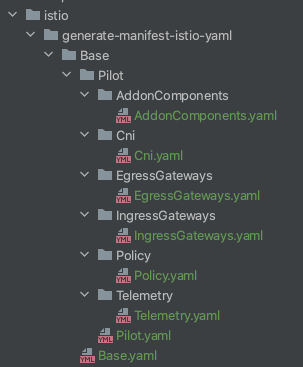
也可以将manifest输出到一个文件
# istioctl manifest generate > generate-manifest-istio.yaml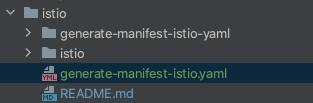
# istioctl manifest install -f addonComponents.yaml# kubectl get deployment -n istio-system# istioctl manifest install -f addonComponents.yaml# kubectl get all -n istio-system NAME READY STATUS RESTARTS AGEpod/grafana-8fdf895f6-tt2x7 1/1 Running 0 16hpod/istio-tracing-85fddf979f-fj76v 1/1 Running 0 16hpod/istiod-6869899d55-lrw9q 1/1 Running 0 16hpod/kiali-777987866-xrz78 1/1 Running 0 16hpod/prometheus-5dc7ccbd8c-58nxf 1/1 Running 0 16hNAME TYPE CLUSTER-IP EXTERNAL-IP PORT(S) AGEservice/grafana ClusterIP 10.0.145.54 <none> 3000/TCP 16hservice/istiod ClusterIP 10.0.228.155 <none> 15010/TCP,15012/TCP,443/TCP,15014/TCP,853/TCP 18hservice/jaeger-agent ClusterIP None <none> 5775/UDP,6831/UDP,6832/UDP 16hservice/jaeger-collector ClusterIP 10.0.125.5 <none> 14267/TCP,14268/TCP,14250/TCP 16hservice/jaeger-collector-headless ClusterIP None <none> 14250/TCP 16hservice/jaeger-query ClusterIP 10.0.133.43 <none> 16686/TCP 16hservice/kiali ClusterIP 10.0.194.167 <none> 20001/TCP 16hservice/prometheus ClusterIP 10.0.124.3 <none> 9090/TCP 16hservice/tracing ClusterIP 10.0.245.10 <none> 80/TCP 16hservice/zipkin ClusterIP 10.0.45.150 <none> 9411/TCP 16hNAME READY UP-TO-DATE AVAILABLE AGEdeployment.apps/grafana 1/1 1 1 16hdeployment.apps/istio-tracing 1/1 1 1 16hdeployment.apps/istiod 1/1 1 1 18hdeployment.apps/kiali 1/1 1 1 16hdeployment.apps/prometheus 1/1 1 1 16hNAME DESIRED CURRENT READY AGEreplicaset.apps/grafana-8fdf895f6 1 1 1 16hreplicaset.apps/istio-tracing-85fddf979f 1 1 1 16hreplicaset.apps/istiod-6869899d55 1 1 1 18hreplicaset.apps/kiali-777987866 1 1 1 16hreplicaset.apps/prometheus-5dc7ccbd8c 1 1 1 16hNAME REFERENCE TARGETS MINPODS MAXPODS REPLICAS AGEhorizontalpodautoscaler.autoscaling/istiod Deployment/istiod 5%/80% 1 5 1 16h原文转载:http://www.shaoqun.com/a/490608.html
华翰物流:https://www.ikjzd.com/w/1799
智赢:https://www.ikjzd.com/w/1511
askme:https://www.ikjzd.com/w/2459
在Kubernetes部署Istio【demo演示】可参考官方文档(https://istio.io/latest/zh/docs/setup/install/),以部署1.7.4版本作为演示,在Mac上安装基础环境cloud(ali)kubernetes(1.16.9)istio(1.7.4)安装配置#mkdiristio#cdistio#wgethttps://github.com/istio
jpgoodbuy:jpgoodbuy
trax:trax
北京哪有清真烤鸭?:北京哪有清真烤鸭?
【首尔七大夜景推荐】 韩国首尔晚上哪里好玩:【首尔七大夜景推荐】 韩国首尔晚上哪里好玩
红色旅游四条线路推荐给你 :红色旅游四条线路推荐给你

No comments:
Post a Comment