k8s:py项目发布流程
1. 编写Dockerfile
# cat Dockerfile FROM python:3.6-slimUSER rootRUN apt-get update && apt-get install gcc -y && \ apt-get clean && \ rm -rf /var/lib/apt/lists/*ADD . /appWORKDIR /appRUN pip install -r requirement.txtEXPOSE 8000CMD [ "uvicorn", "main:app","--host", "0.0.0.0", "--port", "8000" ]2. 验证Docker镜像
3. 编写Pod资源清单
要学会借鉴官网!!!,演示一遍
首先要问清楚业务是有状态还是无状态,无状态就选deployment,有状态就选statefulset。我这里是个小程序,无状态应用。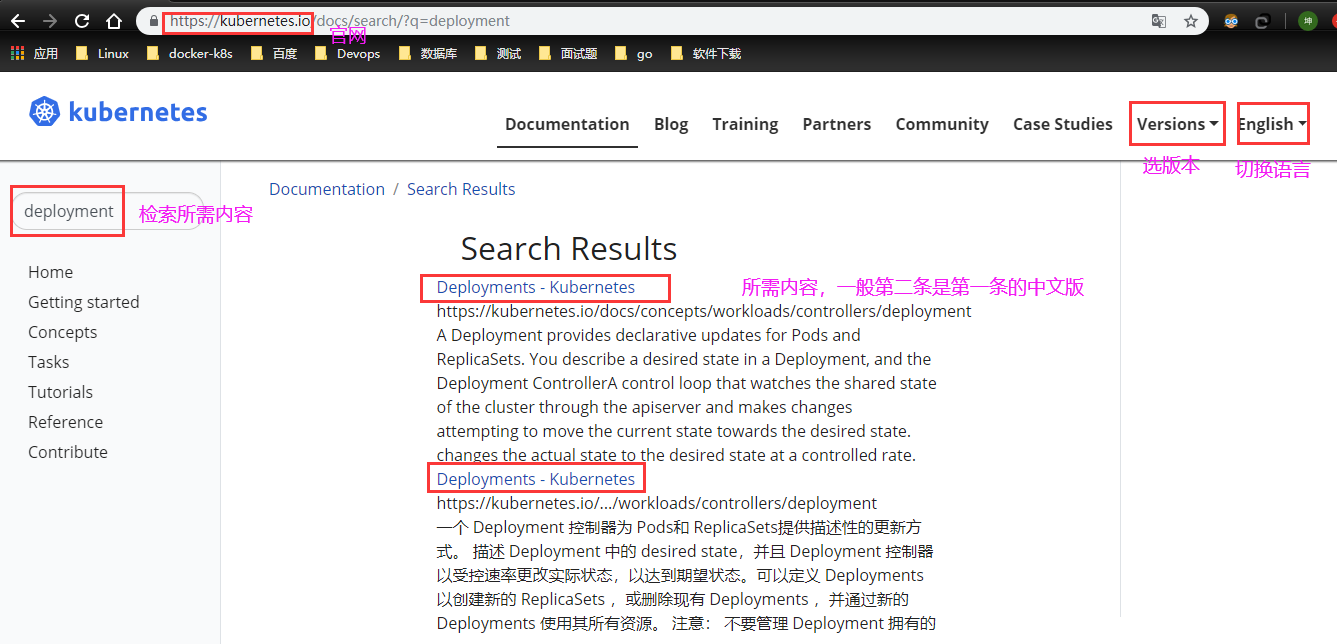
Kubernetes版本变化很快,搞k8s一定要学会看官网。
官方案例
apiVersion: apps/v1kind: Deploymentmetadata: name: nginx-deployment labels: app: nginxspec: replicas: 3 selector: matchLabels: app: nginx template: metadata: labels: app: nginx spec: containers: - name: nginx image: nginx:1.14.2 ports: - containerPort: 80改:是要标签对的上就OK了
###########################################################################Author: zisefeizhu#QQ: 2********0#Date: 2020-06-16#FileName: delpoyment.yaml#URL: https://www.cnblogs.com/zisefeizhu/#Description: The test script#Copyright (C): 2020 All rights reserved###########################################################################apiVersion: apps/v1kind: Deploymentmetadata: name: businesscard-deploymentspec: selector: matchLabels: app: businesscard replicas: 2 # tells deployment to run 2 pods matching the template template: metadata: labels: app: businesscard spec: imagePullSecrets: - name: business-card containers: - name: businesscard imagePullPolicy: "IfNotPresent" image: xxxxxx/business-card:v1 ports: - containerPort: 80004. 编写Service清单
官方案例
apiVersion: v1kind: Servicemetadata: name: my-servicespec: selector: app: MyApp ports: - protocol: TCP port: 80 targetPort: 9376改:标签对的上就OK!
cat service.yaml ###########################################################################Author: zisefeizhu#QQ: 2********0#Date: 2020-06-16#FileName: service.yaml#URL: https://www.cnblogs.com/zisefeizhu/#Description: The test script#Copyright (C): 2020 All rights reserved###########################################################################apiVersion: v1kind: Servicemetadata: name: businesscardspec: #type: NodePort selector: app: businesscard ports: - protocol: TCP port: 80005. 编写ingress清单
这块就要根据不同的ingress-controller 编写不同的ingress,比如nginx、traefik 等
###########################################################################Author: zisefeizhu#QQ: 2********0#Date: 2020-06-17#FileName: nginx-ingress.yaml#URL: https://www.cnblogs.com/zisefeizhu/#Description: The test script#Copyright (C): 2020 All rights reserved###########################################################################apiVersion: extensions/v1beta1kind: Ingressmetadata: name: businesscardspec: # tls: # - hosts: # - businesscard.stage.realibox.com # secretName: businesscard-ingress-secret rules: - host: card.linux.com http: paths: - path: / backend: serviceName: businesscard servicePort: 80006. 验证
资源pod、svc、ingress验证
# kubectl get pods,svc,ingress NAME READY STATUS RESTARTS AGEpod/businesscard-deployment-f69768dd9-zc56p 1/1 Running 1 26hpod/nginx-deployment-6b474476c4-4644v 1/1 Running 0 4h28mpod/nginx-deployment-6b474476c4-b2dwh 1/1 Running 0 4h28mpod/nginx-deployment-6b474476c4-hdsgv 1/1 Running 0 4h28mNAME TYPE CLUSTER-IP EXTERNAL-IP PORT(S) AGEservice/businesscard ClusterIP 10.68.32.93 <none> 8000/TCP 25hservice/kubernetes ClusterIP 10.68.0.1 <none> 443/TCP 3d11hservice/nginx ClusterIP 10.68.185.184 <none> 80/TCP 4h28mNAME CLASS HOSTS ADDRESS PORTS AGEingress.extensions/businesscard <none> card.linux.com 80 6h11mingress.extensions/ingress-test <none> test.ingress.com 80 24hingress.extensions/nginx <none> nginx.linux.com 80 4h28m客户端验证

验证成功。

No comments:
Post a Comment